Read Data
Dalam arsitektur Spring Boot MVC, operasi Read (Membaca Daftar Data) digunakan untuk mengambil seluruh kumpulan data dari database dan menampilkannya kepada pengguna, contoh dalam bentuk tabel atau list.
Untuk contoh kasus pada tutorial ini kita akan menggunakan data Product yang nantinya akan di mapping menjadi table ke database MySQL.

1️⃣ Membuat Entity
Membuat entity Product.java:
import java.math.BigDecimal;

import jakarta.persistence.Column;
import jakarta.persistence.Entity;
import jakarta.persistence.GeneratedValue;
import jakarta.persistence.GenerationType;
import jakarta.persistence.Id;
import jakarta.persistence.Table;
import jakarta.validation.constraints.NotEmpty;
import jakarta.validation.constraints.NotNull;

@Entity
@Table(name = "product")
public class Product {

	@Id
	@GeneratedValue(strategy = GenerationType.IDENTITY)
	@Column(name = "id")
	private Long id;

	@NotEmpty
	@Column(name = "name")
	private String name;

	@NotEmpty
	@Column(name = "description")
	private String description;

	@NotNull
	@Column(name = "price")
	private BigDecimal price;

	public Long getId() {
		return id;
	}

	public void setId(Long id) {
		this.id = id;
	}

	public String getName() {
		return name;
	}

	public void setName(String name) {
		this.name = name;
	}

	public String getDescription() {
		return description;
	}

	public void setDescription(String description) {
		this.description = description;
	}

	public BigDecimal getPrice() {
		return price;
	}

	public void setPrice(BigDecimal price) {
		this.price = price;
	}
}
2️⃣ Repository Layer
Layer Repository ProductRepository.
import org.springframework.data.jpa.repository.JpaRepository;

import com.timposulabs.model.Product;

public interface ProductRepository extends JpaRepository<Product, Long> {

}
3️⃣ Service Layer
ProductService.java
import java.util.List;

import com.timposulabs.model.Product;

public interface ProductService {

	List<Product> findAll();

	Product findById(Long id);

	Product save(Product product);

	void delete(Long id);
}
- Implementasi Service
ProductServiceImpl.java
import java.util.List;

import org.springframework.stereotype.Service;

import com.timposulabs.model.Product;
import com.timposulabs.repository.ProductRepository;

@Service
public class ProductServiceImpl implements ProductService {

	private ProductRepository repository;

	public ProductServiceImpl(ProductRepository repository) {
		this.repository = repository;
	}

	@Override
	public List<Product> findAll() {
		return repository.findAll();
	}

	@Override
	public Product findById(Long id) {
		return repository.findById(id)
				.orElseThrow(() -> new RuntimeException("ID Not Found"));
	}

	@Override
	public Product save(Product product) {
		return repository.save(product);
	}

	@Override
	public void delete(Long id) {
		repository.deleteById(id);
	}
}
4️⃣ Controller
ProductController.java
import java.util.List;

import org.springframework.stereotype.Controller;
import org.springframework.ui.Model;
import org.springframework.web.bind.annotation.GetMapping;
import org.springframework.web.bind.annotation.RequestMapping;

import com.timposulabs.model.Product;
import com.timposulabs.service.ProductService;

@Controller
@RequestMapping("/product")
public class ProductController {

	private ProductService productService;

	public ProductController(ProductService productService) {
		this.productService = productService;
	}

	@GetMapping("/list")
	public String listProduct(Model model) {
		List<Product> productList = productService.findAll();
		model.addAttribute("products", productList);
		return "product-list";
	}
}
5️⃣ Membuat View
- Membuat view untuk Product List Page
product-list.htmldi direktori dimana di sini saya menambahkan Bootstrap untuk css nya.
<!DOCTYPE html>
<html xmlns:th="http://www.thymeleaf.org">
	<head>
		<title>Belajar Spring CRUD</title>
		<meta charset="utf-8">
		<meta name="viewport" content="width=device-width, initial-scale=1">
		<link href="https://cdn.jsdelivr.net/npm/bootstrap@5.3.8/dist/css/bootstrap.min.css" rel="stylesheet" integrity="sha384-sRIl4kxILFvY47J16cr9ZwB07vP4J8+LH7qKQnuqkuIAvNWLzeN8tE5YBujZqJLB" crossorigin="anonymous">
	</head>
	<body>
		<div class="container">
			<h3>Product List</h3>
			<hr />
			<table class="table table-bordered table-striped">
			  <thead>
			    <tr>
			      <th scope="col">ID</th>
			      <th scope="col">Product Name</th>
			      <th scope="col">Description</th>
			      <th scope="col">Price</th>
			    </tr>
			  </thead>
			  <tbody>
			    <tr th:each="product : ${products}">
			      <th scope="row" th:text="${product.id}"></th>
			      <td th:text="${product.name}"></td>
			      <td th:text="${product.description}"></td>
			      <td th:text="${product.price}"></td>
			    </tr>
			  </tbody>
			</table>
		</div>
		<script src="https://cdn.jsdelivr.net/npm/bootstrap@5.3.8/dist/js/bootstrap.bundle.min.js" integrity="sha384-FKyoEForCGlyvwx9Hj09JcYn3nv7wiPVlz7YYwJrWVcXK/BmnVDxM+D2scQbITxI" crossorigin="anonymous"></script>
	</body>
</html>
6️⃣ Menjalankan Aplikasi
Ketika pertama kali dijalankan maka Hibernate akan men-generate entity Product ke tabel database MySQL, tapi disini datanya masih kosong. Disini kita akan menambahkan data ke dalam table product yang ada di dalam database secara manual.
insert into product (name, description, price) values
('Iphone 16', 'The New Generation Iphone', 15000000),
('Samsung Galaxy S25', 'Next Generation Android Smartphone', 16000000),
('Asus ROG Laptop', 'Gaming Laptop', 18000000);
Melihat data:
mysql> select * from product;
+----+------------------------------------+--------------------+-------------+
| id | description                        | name               | price       |
+----+------------------------------------+--------------------+-------------+
|  1 | The New Generation Iphone          | Iphone 16          | 15000000.00 |
|  2 | Next Generation Android Smartphone | Samsung Galaxy S25 | 16000000.00 |
|  3 | Gaming Laptop                      | Asus ROG Laptop    | 18000000.00 |
+----+------------------------------------+--------------------+-------------+
Menjalankan aplikasi Spring Boot:
- Buka terminal di root project.
- Jalankan dengan perintah Maven:
mvn spring-boot:run. - Buka browser dan akses http://localhost:8080/product/list.
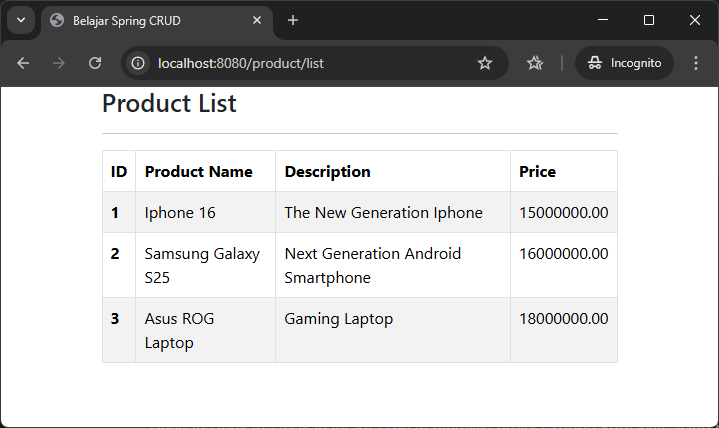
- Untuk menampilkan data
pricesesuai format mata uang, maka kita dapat memperbaharuiapplication.propertiesdengan menambahkan konfigurasi locale Indonesia:
spring.datasource.url=jdbc:mysql://localhost:3306/belajar_spring
spring.datasource.driverClassName=com.mysql.cj.jdbc.Driver
spring.datasource.username=root
spring.datasource.password=rahasia
spring.jpa.show-sql=true
spring.jpa.hibernate.ddl-auto=update

# Mengatur locale default ke Indonesia
spring.web.locale=in_ID
spring.web.locale-resolver=fixed
- Update kolom table
price.
<td th:text="${#numbers.formatCurrency(product.price)}"></td>
