Create Data
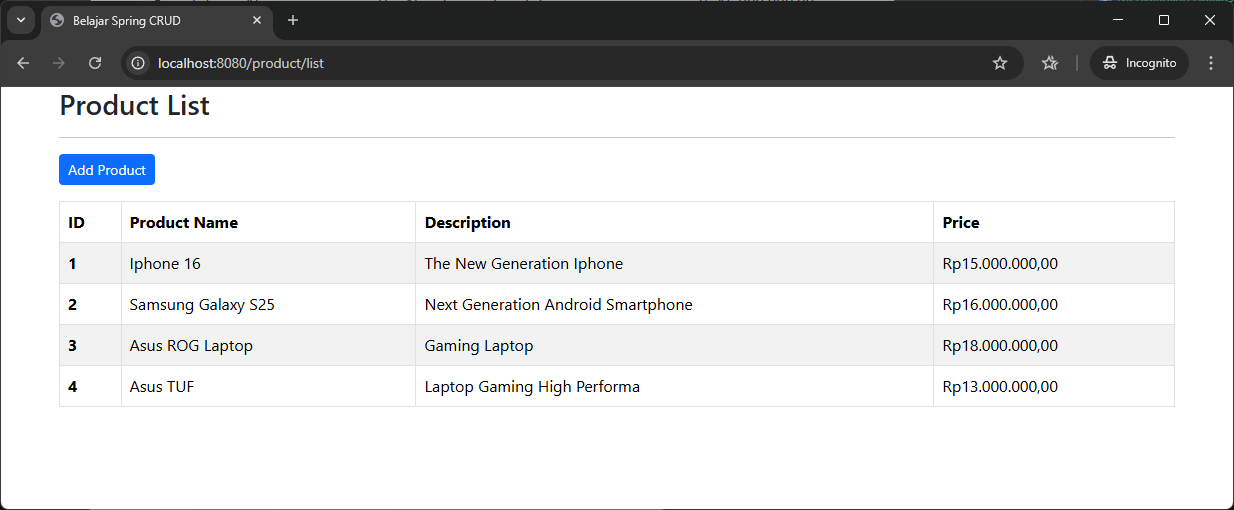
Create adalah proses untuk mengambil data dari input user (melalui <form> HTML) dan menyimpannya sebagai data baru ke dalam database.
Untuk contoh kasus pada tutorial ini kita akan menggunakan data Product yang nantinya akan di mapping menjadi table ke database MySQL.

1️⃣ Entity
Entity Product.java:
import java.math.BigDecimal;

import jakarta.persistence.Column;
import jakarta.persistence.Entity;
import jakarta.persistence.GeneratedValue;
import jakarta.persistence.GenerationType;
import jakarta.persistence.Id;
import jakarta.persistence.Table;
import jakarta.validation.constraints.Min;
import jakarta.validation.constraints.NotEmpty;
import jakarta.validation.constraints.NotNull;
import jakarta.validation.constraints.Size;

@Entity
@Table(name = "product")
public class Product {

	@Id
	@GeneratedValue(strategy = GenerationType.IDENTITY)
	@Column(name = "id")
	private Long id;

	@NotEmpty(message = "Cannot be empty")
	@Column(name = "name")
	@Size(min = 1, message = "Min 1 char")
	private String name;

	@NotEmpty(message = "Cannot be empty")
	@Column(name = "description")
	@Size(min = 1, message = "Min 1 char")
	private String description;

	@NotNull(message = "Is Required")
	@Column(name = "price")
	@Min(value = 0)
	private BigDecimal price;

	public Long getId() {
		return id;
	}

	public void setId(Long id) {
		this.id = id;
	}

	public String getName() {
		return name;
	}

	public void setName(String name) {
		this.name = name;
	}

	public String getDescription() {
		return description;
	}

	public void setDescription(String description) {
		this.description = description;
	}

	public BigDecimal getPrice() {
		return price;
	}

	public void setPrice(BigDecimal price) {
		this.price = price;
	}
}
2️⃣ Repository Layer
Layer Repository ProductRepository.
import org.springframework.data.jpa.repository.JpaRepository;

import com.timposulabs.model.Product;

public interface ProductRepository extends JpaRepository<Product, Long> {

}
3️⃣ Service Layer
ProductService.java
import java.util.List;

import com.timposulabs.model.Product;

public interface ProductService {

	List<Product> findAll();

	Product findById(Long id);

	Product save(Product product);

	void delete(Long id);
}
- Implementasi Service
ProductServiceImpl.java
import java.util.List;

import org.springframework.stereotype.Service;

import com.timposulabs.model.Product;
import com.timposulabs.repository.ProductRepository;

@Service
public class ProductServiceImpl implements ProductService {

	private ProductRepository repository;

	public ProductServiceImpl(ProductRepository repository) {
		this.repository = repository;
	}

	@Override
	public List<Product> findAll() {
		return repository.findAll();
	}

	@Override
	public Product findById(Long id) {
		return repository.findById(id)
				.orElseThrow(() -> new RuntimeException("ID Not Found"));
	}

	@Override
	public Product save(Product product) {
		return repository.save(product);
	}

	@Override
	public void delete(Long id) {
		repository.deleteById(id);
	}
}
4️⃣ Controller
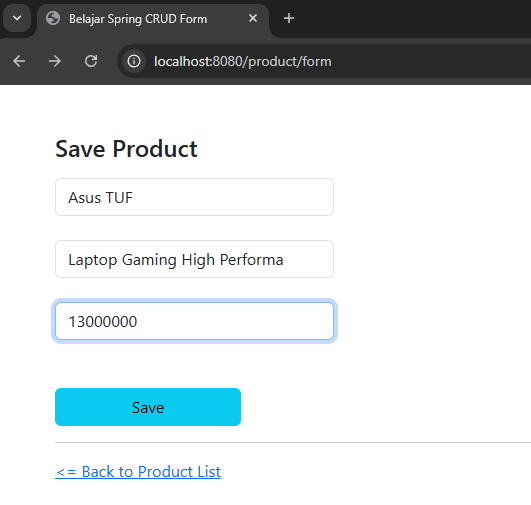
ProductController.javakita akan menambahkan halaman form dan method POST untuk menyimpan data.
import java.util.List;

import org.springframework.stereotype.Controller;
import org.springframework.ui.Model;
import org.springframework.validation.BindingResult;
import org.springframework.web.bind.annotation.GetMapping;
import org.springframework.web.bind.annotation.ModelAttribute;
import org.springframework.web.bind.annotation.PostMapping;
import org.springframework.web.bind.annotation.RequestMapping;

import com.timposulabs.model.Product;
import com.timposulabs.service.ProductService;

import jakarta.validation.Valid;

@Controller
@RequestMapping("/product")
public class ProductController {

	private ProductService productService;

	public ProductController(ProductService productService) {
		this.productService = productService;
	}

	@GetMapping("/list")
	public String listProduct(Model model) {
		List<Product> productList = productService.findAll();
		model.addAttribute("products", productList);
		return "product/product-list";
	}

	@GetMapping("/form")
	public String showForm(Model model) {
		model.addAttribute("product", new Product());
		return "product/product-form";
	}

	@PostMapping("/save")
	public String saveProduct(@Valid @ModelAttribute("product") Product product,
			BindingResult bindingResult) {

		if (bindingResult.hasErrors()) {
			return "product/product-form";
		}

		productService.save(product);
		return "redirect:/product/list";
	}
}
5️⃣ Membuat View
- Kita akan menambahkan link form yang akan mengarah ke
/product/form:
<a th:href="@{/product/form}" class="btn btn-primary btn-sm mb-3">Add Product</a>
- Membuat view untuk Product List Page
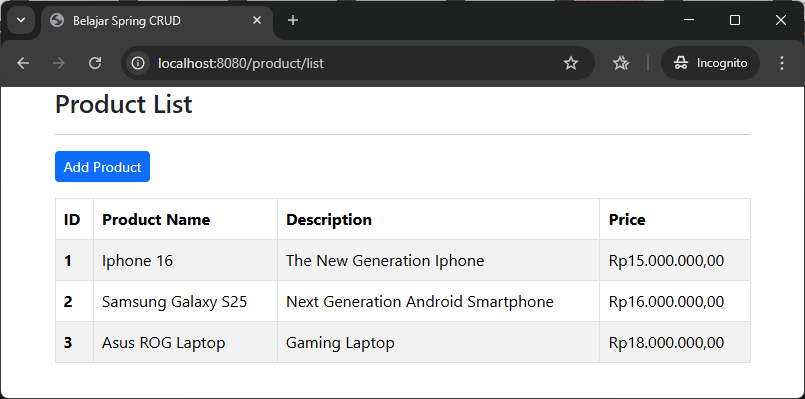
product-list.htmlpada direktorisrc/main/resources/templates/productdimana di sini saya menambahkan Bootstrap untuk css nya.
<!DOCTYPE html>
<html xmlns:th="http://www.thymeleaf.org">
	<head>
		<title>Belajar Spring CRUD</title>
		<meta charset="utf-8">
		<meta name="viewport" content="width=device-width, initial-scale=1">
		<link href="https://cdn.jsdelivr.net/npm/bootstrap@5.3.8/dist/css/bootstrap.min.css" rel="stylesheet" integrity="sha384-sRIl4kxILFvY47J16cr9ZwB07vP4J8+LH7qKQnuqkuIAvNWLzeN8tE5YBujZqJLB" crossorigin="anonymous">
	</head>
	<body>
		<div class="container">
			<h3>Product List</h3>
			<hr />
			<a th:href="@{/product/form}"
				class="btn btn-primary btn-sm mb-3">Add Product</a>
			<table class="table table-bordered table-striped">
			  <thead>
			    <tr>
			      <th scope="col">ID</th>
			      <th scope="col">Product Name</th>
			      <th scope="col">Description</th>
			      <th scope="col">Price</th>
			    </tr>
			  </thead>
			  <tbody>
			    <tr th:each="product : ${products}">
			      <th scope="row" th:text="${product.id}"></th>
			      <td th:text="${product.name}"></td>
			      <td th:text="${product.description}"></td>
			      <td th:text="${#numbers.formatCurrency(product.price)}"></td>
			    </tr>
			  </tbody>
			</table>
		</div>
		<script src="https://cdn.jsdelivr.net/npm/bootstrap@5.3.8/dist/js/bootstrap.bundle.min.js" integrity="sha384-FKyoEForCGlyvwx9Hj09JcYn3nv7wiPVlz7YYwJrWVcXK/BmnVDxM+D2scQbITxI" crossorigin="anonymous"></script>
	</body>
</html>
- Membuat view untuk Product Form Page
product-form.htmlpada direktorisrc/main/resources/templates/productdimana di sini saya menambahkan Bootstrap untuk css nya.
<!DOCTYPE html>
<html xmlns:th="http://www.thymeleaf.org">
	<head>
		<title>Belajar Spring CRUD Form</title>
		<meta charset="utf-8">
		<meta name="viewport" content="width=device-width, initial-scale=1">
		<link href="https://cdn.jsdelivr.net/npm/bootstrap@5.3.8/dist/css/bootstrap.min.css" rel="stylesheet" integrity="sha384-sRIl4kxILFvY47J16cr9ZwB07vP4J8+LH7qKQnuqkuIAvNWLzeN8tE5YBujZqJLB" crossorigin="anonymous">
		<style>
			.error {color: red;}
		</style>

	</head>
	<body>
		<div class="container">
			<p class="h4 mb-3 mt-5">Save Product</p>
			<form
				th:action="@{/product/save}"
				th:object="${product}"
				method="post">
					<input type="hidden" th:field="*{id}" />

					<input type="text" th:field="*{name}" class="form-control mb-4 w-25" placeholder="Product Name" />
					<span th:if="${#fields.hasErrors('name')}"
									  th:errors="*{name}"
									  class="error mb-4"></span>

					<input type="text" th:field="*{description}" class="form-control mb-4 w-25" placeholder="Product Description" />
					<span th:if="${#fields.hasErrors('description')}"
									  th:errors="*{description}"
									  class="error mb-4"></span>

					<input type="text" th:field="*{price}" class="form-control mb-4 w-25" placeholder="Product Price" />
					<span th:if="${#fields.hasErrors('price')}"
									  th:errors="*{price}"
									  class="error mb-4"></span>
					<br />
					<button type="submit" class="btn btn-info col-2">Save</button>
			</form>
			<hr />
			<a th:href="@{/product/list}"><= Back to Product List</a>
		</div>
		<script src="https://cdn.jsdelivr.net/npm/bootstrap@5.3.8/dist/js/bootstrap.bundle.min.js" integrity="sha384-FKyoEForCGlyvwx9Hj09JcYn3nv7wiPVlz7YYwJrWVcXK/BmnVDxM+D2scQbITxI" crossorigin="anonymous"></script>
	</body>
</html>
6️⃣ Menjalankan Aplikasi
Menjalankan aplikasi Spring Boot:
- Buka terminal di root project.
- Jalankan dengan perintah Maven:
mvn spring-boot:run. - Buka browser dan akses http://localhost:8080/product/list.